자바스크립트(JavaScript) | 출력하는 방법(Output)
👀 코드설명
[window.]는 생략가능합니다.
function fnOutputTest() {
	console.log("hello");
	console.log('javascript');
	console.log(1000);
	console.log("hello" + 1000);
	console.log("Hello", 1000);

	alert('hello javascript');
	// alerts(1000);

	document.write("<h1>hello javascript</h1>");
}
1️⃣ 콘솔에 출력하는 방법
[window.]console.log(출력값);
✍console.log( "hello" );
⏩hello
✍console.log( ' javascript ' );
⏩hello
✔️큰따옴표 ( " " )와 작은따옴표 ( ' ' ) 를 구분하지 않습니다.
✍console.log( 1000 );
⏩1000
✍console.log( "hello" + 1000 );
⏩hello1000
✔️ + 로 연이으면 무조건 문자열로 합쳐집니다.
✍console.log( "hello" , 1000 );
⏩hello 1000
✔️ , 로 나열하면 각 값을 각 타입으로 볼 수 있습니다.
💬콘솔은 브라우저창에서 F12를 누르면 나오는 개발자도구창에 있는 콘솔창을 말합니다.
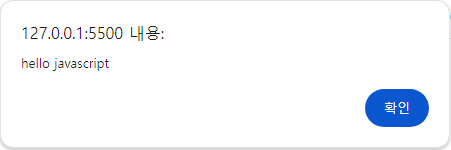
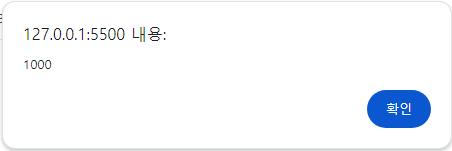
2️⃣ 알람창으로 출력하는 방법
[window.]alert(출력값);
✍console.log( 'hello javascript' );
⏩
✍console.log( 1000 );
⏩
3️⃣ 화면에 출력하는 방법
✍document.write(출력값);
4️⃣ 특정요소에 출력하는 방법(생략)
✍요소객체.innerHTML = 출력값;
✍요소객체.innerTEXT = 출력값;
자바스크립트(JavaScript) 작성한 함수 호출하는 방법
fnOutputTest();
<button onclick="fnOutputTest()">출력테스트</button><br><br>
1️⃣ 바로 호출하기
✍fnOutputTest();
2️⃣ 버튼을 통해 함수 호출하기
✍<button onclick="fnOutputTest()">버튼</button>
💬function { }내에 작성한 내용을 호출해줍니다.
'JavaScript' 카테고리의 다른 글
| 자바스크립트(JavaScript) | document.getElementById().value; (0) | 2024.08.14 |
|---|---|
| 자바스크립트(JavaScript) | 주석하는 방법 (0) | 2024.08.13 |
| 자바스크립트(JavaScript) | 개념 및 장단점 (0) | 2024.08.13 |
| 자바스크립트(JavaScript) | 01_변수(variable) (0) | 2024.08.08 |
